Design Page 7
Gain insights into the latest tech design trends, UX/UI best practices, and powerful design tools with FoxDooTech.

Canva’s new 3D Object Generator turns sketches into fully lit models you can spin, color, and drop into scenes—no 3D software required. Social-first brands can now mock up product shots in minutes. Explore more: More Design briefs
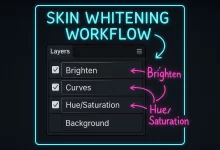
I still remember my first Photoshop Skin Whitening disaster—fresh outta college, I cranked the Curves layer so high my model looked like a glow-in-the-dark mannequin. My art director laughed so hard coffee shot out of his nose. Never again. After a decade of retouching gigs—from Instagram campaigns to glossy billboard spreads—I’ve honed a rock-solid workflow that brightens skin naturally, keeps pores intact, and never crosses the line into ghost-town. This mega-guide packs over 2,000 words of practical tips, code snippets, and pro anecdotes so you can master Photoshop Skin Whitening once and for all. Skin-Tone Science 101 Before we dive into juicy sliders, let’s geek out—just a little—about why human skin reacts the way it does under pixels and photons. Melanin...
Adobe’s June 24 release lets editors feed a screenplay or transcript into Premiere Pro; the new AI “Script-Aware Auto-Edit” assembles a rough cut in seconds, slashing post-production time for documentaries and vlogs. Explore more: More Design briefs
Figma launched ColorWhiz, an AI-powered tool that suggests harmonious color palettes from any image or brand asset. Designers can now instantly generate, preview, and apply dynamic themes across their entire project with one click. Explore more: More Design briefs
Adobe rolled out Photoshop 2025’s Generative Fill for context-aware image expansion, plus a Vectorize tool that turns rasters into editable vectors with AI precision. Both features are live today. Explore more: More Design briefs
Many designers are now fully embracing Figma, ditching Adobe tools entirely. Figma’s browser-based, collaborative environment streamlines workflow, eliminating software hopping and enhancing team collaboration in real-time. Explore more: More Design briefs
By mid-2025, Figma continues to dominate as the primary design software, but designers are now increasingly developing UX and interactive skills. The shift highlights a broader industry trend toward blending traditional visual design with usability and collaboration. Explore more: More Design briefs
Adobe’s Photoshop update (version 26.8) introduces dynamic text boxes that adjust automatically, along with cloud-boosted Select Subject capabilities. Designers can now streamline workflows with smarter layouts and faster object selection. Explore more: More Design briefs
Adobe has launched a mobile version of its popular generative AI service, Firefly, enabling creatives to generate visuals on-the-go. The app debuts with native support for Adobe’s models, soon adding premium generative options from industry partners like OpenAI and Google. Explore more: More Design briefs
I still remember opening a dull, washed-out rooftop shot at two in the morning. Coffee gone cold. Brain kinda fried. But I was stubborn—I knew the frame had potential. Twenty minutes and one tonal-separation pass later, bam: the sky popped, the city lights hummed, and I felt like I’d rescued a hidden gem from the recycle bin. That tiny victory is why I’m writing this guide. Let’s talk real-world Photoshop magic—no fluff, no corporate jargon. First Things First: What the Heck Is Tonal Separation? In plain English, we split the image into brighter and darker chunks, then treat each chunk like its own mini canvas. Think of it as contouring for pixels. You can pump warmth into highlights, cool off...

 FoxDoo Technology
 FoxDoo Technology