 FoxDoo Technology
I’m gonna say the quiet part out loud: the day I switched to a Claude Code local LLM workflow, my laptop stopped feeling like a thin client and started feeling like a superpower. On a rainy Tuesday, Wi-Fi went down at a client site. No cloud. No API keys. Yet I kept shipping because everything—from code generation to small refactors—ran on my box. This guide distills exactly how to replicate that setup, with opinionated steps that work on macOS, Windows, and Linux.
Best for: developers and technical operators who want a private coding assistant for local files, internal repositories, sensitive client code, or offline experiments.
2026 update: This guide is most useful for technical operators and small teams that want AI-assisted coding workflows without sending sensitive project context to every cloud tool by default. If you are still choosing your broader stack, start with FoxDoo Technology’s practical guide to the best AI tools for small teams in 2026 and the automation-platform comparison Zapier vs Make vs n8n in 2026.
When a Local LLM Coding Workflow Makes Sense
A local LLM coding workflow is not the right default for every small team. It makes the most sense when your team has sensitive source code, client projects under confidentiality rules, unreliable internet access, or a technical operator who can maintain the local environment. For most non-technical teams, a hosted coding assistant or managed AI workspace will be faster to adopt. For technical teams, the value of a local setup is control: you can decide what context stays on device, what gets sent to cloud AI tools, and where human review is required before code changes ship.
- Sensitive client or proprietary code needs stricter context boundaries.
- Developers want AI help for refactoring, explanation, and test scaffolding without exposing every file externally.
- The team has a technical owner who can maintain models, hardware, and updates.
- The workflow is paired with code review, tests, and clear security rules.
Small-Team Guardrails for Private AI Coding
Treat a local coding assistant as a productivity layer, not an autonomous engineer. Keep a human review step for every generated change, run tests before merging, avoid pasting secrets into prompts, and document which projects are approved for local-only AI assistance. If the team later connects this workflow to ticketing, documentation, or deployment automation, use the same approval pattern used for safe automation workflows: AI drafts, humans approve, and production changes stay traceable.
- Do not paste credentials, tokens, customer data, or private keys into prompts.
- Require human review before commits, pull requests, or deployments.
- Use project-specific context folders instead of exposing the entire workstation.
- Keep a simple audit note for generated code changes when used on client projects.
- Re-check model and license assumptions before using outputs commercially.
For broader tool selection and workflow design, browse FoxDoo Technology’s AI tools and automation guides, or read more about the site’s practical editorial focus on the About page.
Not ideal for: teams that need instant cloud-model quality, managed collaboration, or zero-maintenance setup.
Practical takeaway: a Claude Code local LLM workflow is strongest when privacy and control matter more than peak model performance.
Model-Stack Options for a Private Claude Code Workflow
The local model layer is not the whole workflow. Claude Code still needs a practical operating pattern: a scoped repository, a clear task, a review habit, and a fallback path when a local model is too slow or too weak for the job. For small teams, the best stack is usually the simplest one that developers will actually maintain.
| Stack option | Best fit | Watch out for | Practical first use |
|---|---|---|---|
| Ollama | Fast local experiments and repeatable developer setup | Model quality varies by size and hardware | Repository Q&A, test ideas, README drafts |
| LM Studio | Teams that want a visual local-model workspace | Manual configuration can drift between machines | Comparing local models before standardizing |
| llama.cpp or a local server | Technical operators who need more control | Requires stronger ownership for updates and monitoring | Shared internal coding assistant endpoint |
| Hosted coding model | Complex reasoning, large context, or low-maintenance adoption | Sensitive context may leave the local environment | Architecture planning, code review suggestions, documentation |
A good rule: keep sensitive code exploration local when privacy is the reason for the setup, but do not force every coding task through a local model if quality, latency, or maintenance cost makes the team slower.
Workflow Recipes for Technical Operators
Use local AI assistance as a repeatable workflow, not as a magic prompt box. These recipes connect the private coding setup to the broader small-team automation habits covered in FoxDoo Technology’s best AI tools for small teams guide and the AI project management tools comparison.
- Module summary before editing: ask the assistant to explain one folder, dependency chain, or risky file before making changes.
- Bugfix test planning: describe the failing behavior, ask for likely edge cases, then write or review tests before touching production code.
- Refactor checklist: generate a step-by-step plan, identify rollback points, and keep changes small enough for human review.
- Documentation refresh: turn a completed change into README notes, runbook updates, or onboarding explanations.
- Ticket handoff: convert meeting notes or support context into implementation tasks, then route them into the team’s project workflow.
If the workflow starts touching customer support, reporting, or operations data, pair the coding setup with the approval-gate pattern used in FoxDoo Technology’s automation workflows: AI can draft, summarize, and suggest, but a person still approves customer-facing, production, and security-sensitive changes.
FAQ: Claude Code and Local LLMs for Small Teams
Should every small team run a local coding model?
No. A local model makes sense when privacy, offline work, repeatable internal context, or technical control matters enough to justify setup and maintenance. If the team only needs occasional coding help, a hosted assistant with clear data rules may be simpler.
Can a local LLM replace code review?
No. Treat it as a drafting and analysis assistant. Human review, tests, branch protection, and deployment controls still matter, especially when AI output changes production systems or customer-facing behavior.
What should teams avoid putting into prompts?
Avoid credentials, API keys, private customer data, production secrets, and unrestricted repository dumps. Keep the prompt context narrow and use project-specific rules so the assistant sees only what it needs for the task.
For more privacy and infrastructure tradeoffs, see the self-hosted LLM small-business checklist. For broader AI coding tool selection, compare ChatGPT vs Claude vs Gemini for coding.
Why pair Claude Code with a local LLM?
Four reasons keep pulling engineers toward a Claude Code local LLM stack:
- Privacy by default. Your source never leaves disk. No third-party logs, no audit surprises.
- Latency you can feel. Local inference eliminates cross-region round-trips. Iteration becomes snappy.
- Cost control. Spin models up or down without watching tokens like a hawk.
- Reliability offline. Airplane mode, café dead zones, client sites with strict firewalls—keep coding anyway.
If that sounds like your day-to-day, a Claude Code local LLM setup is more than a hobby project—it’s a productivity moat.
What we’re building (at a glance)
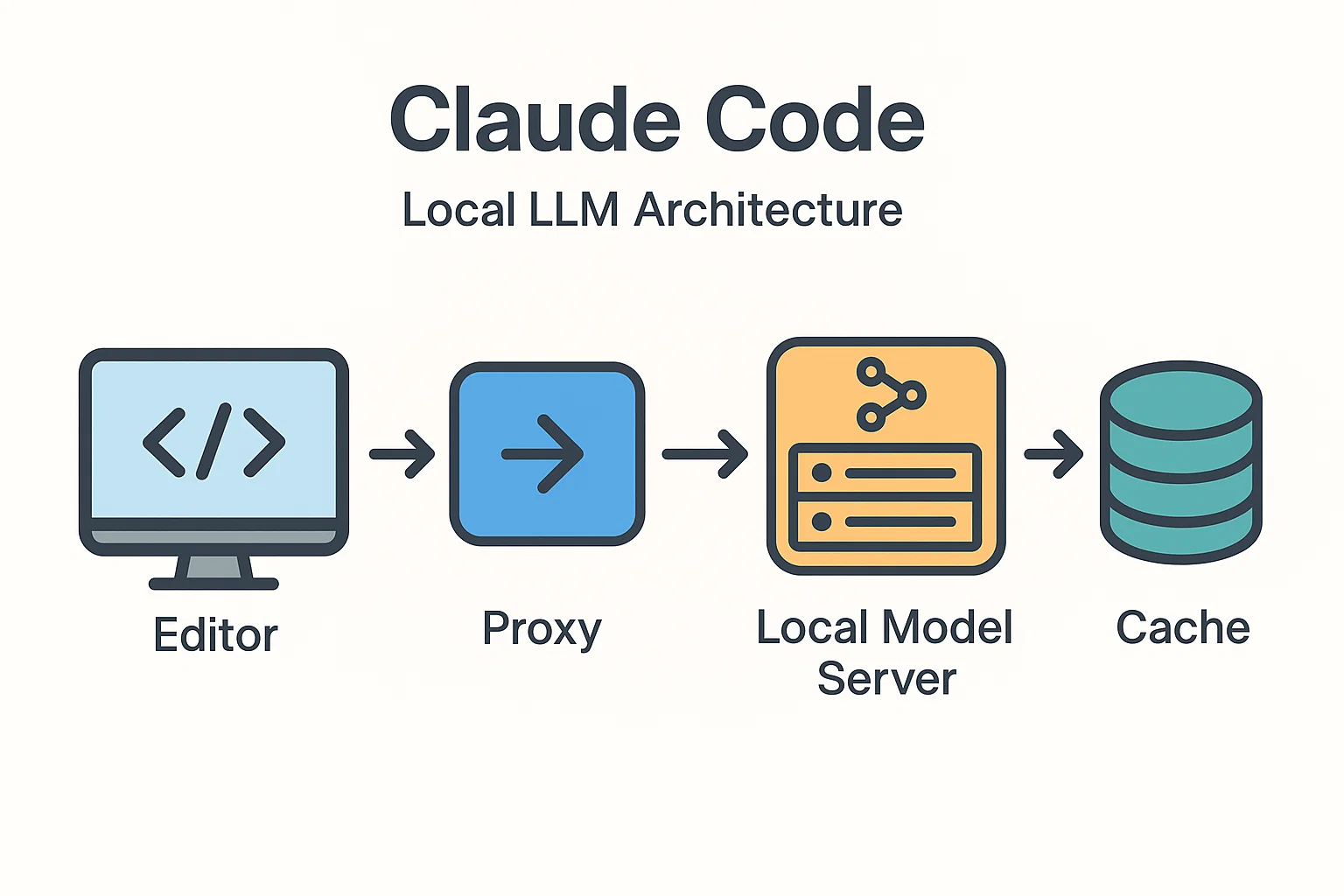
We’ll wire your editor’s Claude Code extension to a local, OpenAI-compatible endpoint. You’ll have two choices for the model server:
- Ollama (easiest path; OpenAI-compatible endpoints, great model library). Docs
- llama.cpp / LM Studio (lean binaries and GUIs for bare-metal control).
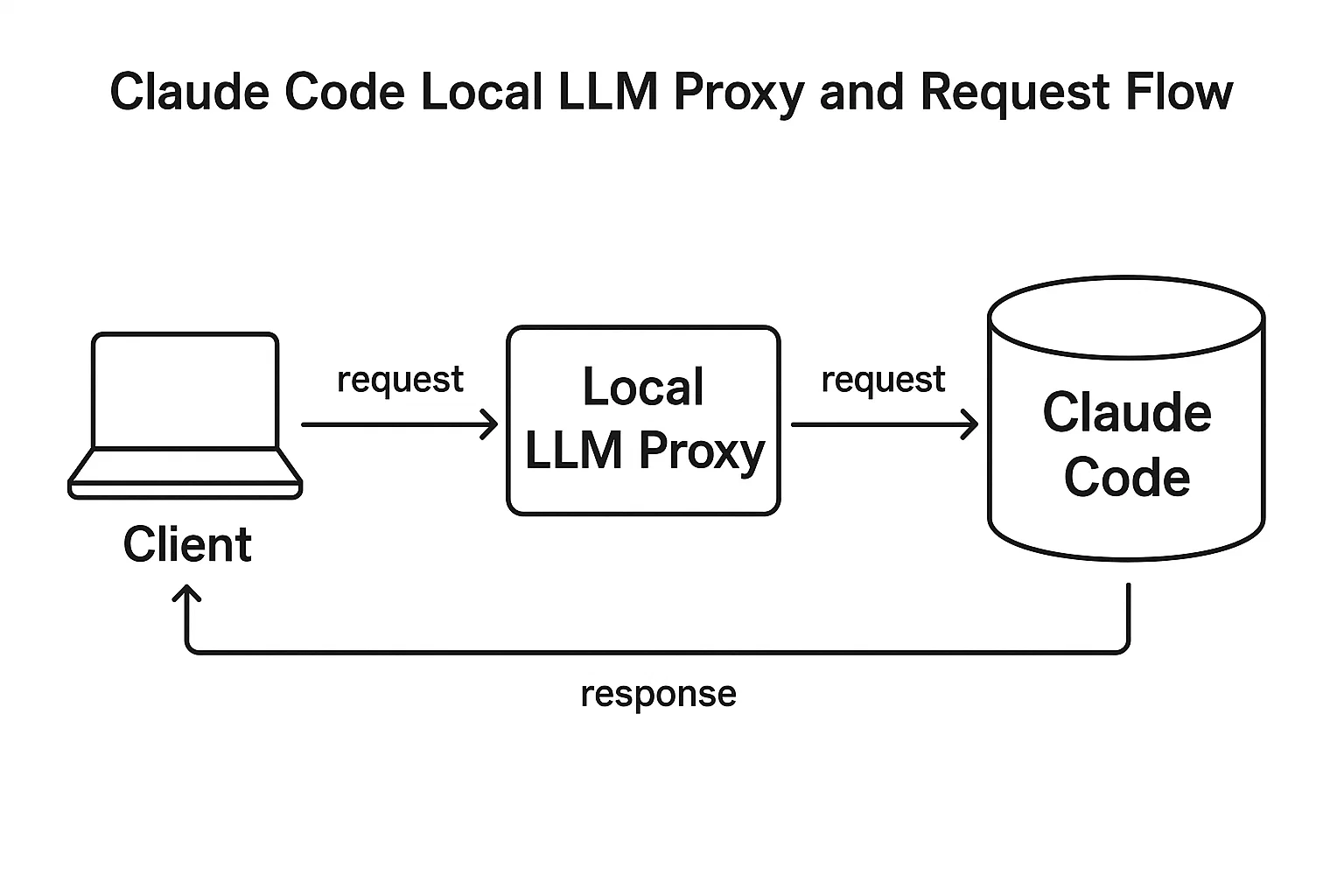
And if your tool expects a slightly different payload, we’ll drop in a tiny FastAPI proxy so Claude Code stays happy while your model speaks its own dialect.
Prerequisites
- macOS 13+/Windows 11/Ubuntu 22.04+
- Python 3.10+ (for the optional proxy)
- 16 GB RAM minimum (32 GB recommended), and a modern GPU if you want speed
- Disk space: 8–20 GB for models depending on the size/quantization
Optional (but nice): Transformers for advanced local workflows and custom fine-tuning down the road. If you want to learn what’s new on the Claude side, skim Claude Code’s product page for feature orientation and editor integrations.
Step 1 — Install Claude Code in your editor
Claude Code runs great in terminals and popular editors. Install it via your editor’s marketplace or use the official CLI instructions. Keep this guide handy—we’ll point the extension at our local endpoint in a minute. A Claude Code local LLM flow still uses all the goodies (chat, “explain”, “edit file”, etc.), it just targets your own server.
Step 2 — Choose and install your local model stack
Option A: Ollama (recommended for most devs)
# macOS (Homebrew) brew install ollama ollama serve &
Pull a solid coding model (examples)

ollama pull llama3

or

ollama pull mistral

Quick sanity check

curl http://localhost:11434/api/tags
Ollama exposes OpenAI-compatible endpoints at http://localhost:11434/v1/. That’s what makes a Claude Code local LLM setup so simple—you’ll reuse the same schema your tools already understand.
Option B: llama.cpp server (lean & portable)
# Build llama.cpp (Linux example) git clone https://github.com/ggerganov/llama.cpp cd llama.cpp && make
Start the server, point at your GGUF model file

./server -m ./models/Meta-Llama-3-8B.Q4_K_M.gguf -c 4096 --port 8080
Some editors integrate directly; others prefer an OpenAI schema. If yours needs the latter, plug in the tiny proxy in the next step.
Step 3 — (Optional) Add a tiny proxy to smooth out API differences
If your editor or Claude Code extension expects /v1/chat/completions and your runtime speaks a slightly different JSON, drop in this FastAPI shim. It’s a few lines and keeps your Claude Code local LLM workflow stable across backends.
# Create a virtualenv python -m venv .venv source .venv/bin/activate # Windows: .venv\Scripts\activate pip install fastapi uvicorn requests # save as proxy.py from fastapi import FastAPI, Request from pydantic import BaseModel import requests, os OLLAMA_API = os.getenv("OLLAMA_API", "http://localhost:11434") app = FastAPI() class Message(BaseModel): role: str content: str class ChatRequest(BaseModel): model: str messages: list[Message] temperature: float | None = 0.2 max_tokens: int | None = 1024 stream: bool | None = False @app.post("/v1/chat/completions") def chat(req: ChatRequest): # Rewrap OpenAI-style into Ollama chat payload payload = { "model": req.model, "messages": [{"role": m.role, "content": m.content} for m in req.messages], "options": {"temperature": req.temperature} } r = requests.post(f"{OLLAMA_API}/api/chat", json=payload, timeout=120) r.raise_for_status() data = r.json() # Rewrap back to OpenAI-style response text = "".join([m.get("content", "") for m in data.get("message", {}).get("content", [])]) \ if isinstance(data.get("message", {}).get("content", []), list) \ else data.get("message", {}).get("content", "") return { "id": "chatcmpl-local", "object": "chat.completion", "choices": [{ "index": 0, "finish_reason": "stop", "message": {"role": "assistant", "content": text} }], "usage": {"prompt_tokens": 0, "completion_tokens": 0, "total_tokens": 0}, "model": req.model } # Run: # uvicorn proxy:app --host 127.0.0.1 --port 5001 Start it:
uvicorn proxy:app --host 127.0.0.1 --port 5001 Step 4 — Point Claude Code at your local endpoint
Open your extension’s settings and set the base URL to your local endpoint:
- Direct to Ollama:
http://127.0.0.1:11434/v1 - Via proxy:
http://127.0.0.1:5001/v1
Set a default model—e.g., llama3 or mistral—and you’re done. That’s a production-ready Claude Code local LLM setup with clear separation: editor ↔ proxy ↔ local model server.
Step 5 — Your first real tasks (copy-paste friendly)
Generate a focused code snippet
# Prompt to paste into Claude Code: "Write a Python function `top_k` that returns the k largest integers from a list. Return a new list in descending order. Include doctests." Debug something that returns None
# Prompt: "This function returns None unexpectedly. Explain why and fix it:

def pick(users):
winner = max(users, key=lambda u: u['score'])
print(winner)
"
Performance check: a slow SQL query
# Prompt: "Given this PostgreSQL EXPLAIN ANALYZE output, propose an index or query rewrite: [ paste output here ]" Generate tests
# Prompt: "Write pytest unit tests for `top_k`. Cover empty list, negative numbers, and ties. Use parametrize. Then propose one refactor." These are the same muscle groups you’ll use daily. The win is that your Claude Code local LLM now runs them with zero cloud calls.
Picking the right local model (quick guide)
| Model | Why pick it | Notes |
|---|---|---|
| Llama 3 8B | Great generalist; fast on consumer GPUs/Apple Silicon | Pull via Ollama; good balance for coding prompts |
| Mistral 7B | Lean and sharp for code completion | Small memory footprint; strong latency |
| Qwen 7B/14B | Solid coding/coT reasoning | Slightly heavier; good trade-offs for analysis tasks |
Memory, context, and prompt engineering that actually help
- Thin context > giant dumps. Give just the key files, interfaces, and error text. Your Claude Code local LLM will reason better and faster.
- Sketch a rulebook. Keep a
claude.mdin the repo that states style, constraints, and acceptance checks. Reference it in prompts. - Use structured outputs. Ask for JSON plans, then render human-readable text from that. Fewer hallucinations, cleaner diffs.
Performance tuning: get those tokens per second up
Three levers matter most:
- Quantization. Q4_K_M or Q5_K_M often hit the sweet spot on 7B–8B models.
- GPU offload. On Apple Silicon, Metal acceleration gives big wins; on NVIDIA, ensure recent drivers and adequate VRAM.
- Context length. Don’t max it out by default. For most tasks, 4k–8k is fine and faster than 32k.
While benchmarking, I keep a notebook of latency and token-per-second for common prompts. That’s how a Claude Code local LLM becomes predictably fast over time.
Troubleshooting (copy-paste fixes)
“Connection refused” or timeouts
# Check the server is up curl http://127.0.0.1:11434/v1/models
If proxying:

curl http://127.0.0.1:5001/v1/chat/completions -s -o /dev/null -w "%{http_code}\n" -d
'{"model":"llama3","messages":[{"role":"user","content":"ping"}]}'
-H "Content-Type: application/json"
Weird or empty completions
- Lower temperature (0.1–0.3) for code; increase max tokens.
- Reduce context—trim long logs or irrelevant files.
- Pin a deterministic model version (e.g., specific GGUF build).
High RAM usage
- Drop to a smaller quant (Q4-ish) or a 7B model.
- Close other GPU-hungry apps (browsers, video editors).
Security and privacy guardrails
- No secrets in prompts. Scrub tokens/keys before sharing snippets with teammates.
- Local logs, local retention. If you log prompts/responses, keep them on disk and rotate aggressively.
- Permission walls. If you attach tool-use (shell, DB access), ensure the proxy enforces whitelists and read-only defaults.
Advanced workflows you’ll actually use
Fine-tune on your codebase (lightweight)
Use small, well-curated samples: docstrings, public utility code, and a handful of unit tests. When you’re ready to go deeper, Transformers and PEFT (LoRA/QLoRA) keep compute modest. Bake the weights and run inference locally so your Claude Code local LLM “speaks” your project.
CI/CD tie-in (no cowboy merges)
Have Claude Code propose a patch and tests locally, but ship through CI with reviews. For ideas on agentic patterns and change control, this playbook pairs nicely with our in-depth guide Agentic AI: 27 Unstoppable, Game-Changing Plays for Real-World IT Ops. (Yes—exactly two internal links in this article, and this is one.)
Editor deep-links
VS Code and JetBrains let you bind tasks to commands. I map “Generate unit tests” to a command that packages context (selected files + failing tests) and sends it to my Claude Code local LLM endpoint.
A minimal RAG recipe (because context beats vibes)
When tasks rely on internal docs, a tiny retrieval layer turns a decent model into a laser. Here’s a dead-simple local RAG sketch you can extend later:
# rag_simple.py import json, os, requests from pathlib import Path from sentence_transformers import SentenceTransformer from sklearn.neighbors import NearestNeighbors import numpy as np
Index docs

model = SentenceTransformer("all-MiniLM-L6-v2")
docs = [p for p in Path("docs").glob("**/*.md")]
emb = model.encode([p.read_text() for p in docs], convert_to_numpy=True)

nn = NearestNeighbors(metric="cosine").fit(emb)

def retrieve(q, k=4):
qv = model.encode([q], convert_to_numpy=True)
idx = nn.kneighbors(qv, k, return_distance=False)[0]
return [docs[i].read_text() for i in idx]

def ask(prompt):
ctx = "\n\n".join(retrieve(prompt))
payload = {
"model": "llama3",
"messages": [
{"role":"user","content": f"Use ONLY this context:\n{ctx}\n\nQuestion: {prompt}"},
],
"temperature": 0.1
}
r = requests.post("http://127.0.0.1:5001/v1/chat/completions", json=payload)
return r.json()["choices"][0]["message"]["content"]

print(ask("What is our password rotation policy?"))
This runs entirely on your machine and funnels curated context into the Claude Code local LLM for precise answers.
Model management tips that save time later
- Name your defaults. Keep a lightweight model for drafts (
mistral) and a bigger one for tricky tasks (llama3:instructvariant). - Cache warmups. Before live demos, run a few prompts to prime memory maps.
- Version folders. I keep
models/llama3-8b-q4vsmodels/llama3-8b-q5so rollbacks are one symlink flip.
Where this fits in your broader AI stack
Local doesn’t mean isolated. A fast, private Claude Code local LLM becomes the nucleus of your day-to-day and plays fine with cloud when you need bigger models. If you’re comparing toolchains for the rest of your workflow, you may also like our roundup Best AI Tools 2025: The Insider’s Guide for app picks that complement on-device coding.
How this compares with cloud coding assistants
A local LLM workflow is not always the fastest or smartest option. For architecture planning, unfamiliar frameworks, and high-stakes debugging, many teams should still compare results against a stronger cloud assistant.
If you are choosing between cloud coding tools first, read our workflow-focused comparison: ChatGPT vs Claude vs Gemini for Coding (2026). Use that guide to choose the right model for planning, refactoring, testing, and documentation before deciding whether a private local setup is worth the maintenance.
Editor-level best practices (learned the hard way)
- Pin a project context. In multi-repo setups, declare path filters (
src/**.ts,apps/api/**) so requests stay lean. - Set a house style. Decide tabs, imports, naming, error handling. Put it in
claude.mdand reference it in prompts. - Fail fast in staging. Break things in a sandbox before it touches prod. Your local assistant should propose diffs, not push them.
21 steps checklist — print this
- Install Claude Code extension.
- Install Ollama or llama.cpp.
- Pull a coding-friendly model.
- Sanity-check the local endpoint.
- (Optional) Stand up the proxy on
5001. - Point Claude Code at
/v1. - Set
temperaturelow for code tasks. - Limit context; include only relevant files/logs.
- Adopt JSON outputs for plans/refactors.
- Keep a
claude.mdrulebook at repo root. - Warm caches before demos.
- Track latency and tokens/sec for common prompts.
- Use smaller quant for mobile or RAM-limited hosts.
- Record a “known good” model version.
- Bind editor commands for common prompts.
- Wire a simple RAG on top of local docs.
- Never paste secrets; scrub inputs.
- Rotate logs and keep them local.
- Use approvals in CI even if local proposes patches.
- Teach your assistant your house style via examples.
- Write down what the assistant should not do.
Reality check: when to use cloud anyway
If you need massive context windows, cutting-edge reasoning, or heavy multimodal, a cloud model might still be the better tool for the job. The beauty of your Claude Code local LLM kit is that it covers 80–90% of daily dev work. For the rest, hop to cloud temporarily—then come back home.
Closing thoughts
Running a Claude Code local LLM isn’t about being contrarian—it’s about control. Control over latency, cost, and privacy. Control over how your tools behave on a spotty connection at 11:48 p.m. when a bug won’t sleep. Set it up once, keep it tidy, and you’ll feel the difference every single day.
Claude Code local LLM FAQ
Is a local LLM good enough for daily coding?
A local LLM can be useful for code explanation, boilerplate, documentation, test generation, and privacy-sensitive review. For complex architecture decisions or unfamiliar frameworks, most teams should still compare the output against a stronger cloud model.
When should a developer choose local Claude-style workflows over ChatGPT, Claude, or Gemini?
Choose a local workflow when privacy, offline access, or control over local files matters more than peak model quality. Choose ChatGPT, Claude, or Gemini when you need faster reasoning, broader ecosystem integrations, or less setup overhead.
What is the safest way to test a local coding assistant?
Start with a non-critical repository, disable auto-apply changes, require human review for every patch, and compare results against your existing tests before using the workflow on production code.